Recharging a vendor bill
The home pays one bill — the doctor’s co-payment summary, the hairdresser’s or the chiropodist’s monthly statement — and then has to pass each line on to the resident it concerns. The Vendor-bill recharges screen does it in one document: the bill’s lines come in on their own, you say who each one is for, and validation writes one supplement on each resident’s envelope.
Where the charges land
A recharge writes on the resident’s supplement envelope, the same one described in Supplements. From the billing period onwards, a recharged supplement behaves exactly like one keyed by hand.
Before you start
The bill must be posted: a draft bill can still change under the residents’ supplements, so Resthome refuses it.
The products you buy and pass on carry a flag in their record, Rechargeable to residents. It is what makes the button appear on the bill. Set it on the hairdressing, chiropody or doctor-fee products of your catalog.
A bill line with no product
A statement typed as a plain “Hairdresser, March” line, with no product at all, is picked up too — you then point it at the right supplement product inside the recharge. Validation requires that product: the flat-rate agreements are keyed on it.
1. Start the recharge from the bill
Open the supplier bill in Accounting → Vendor bills and click Recharge to residents. Resthome creates the recharge, pre-filled with one line per eligible bill line — product, wording and untaxed amount — and opens it.
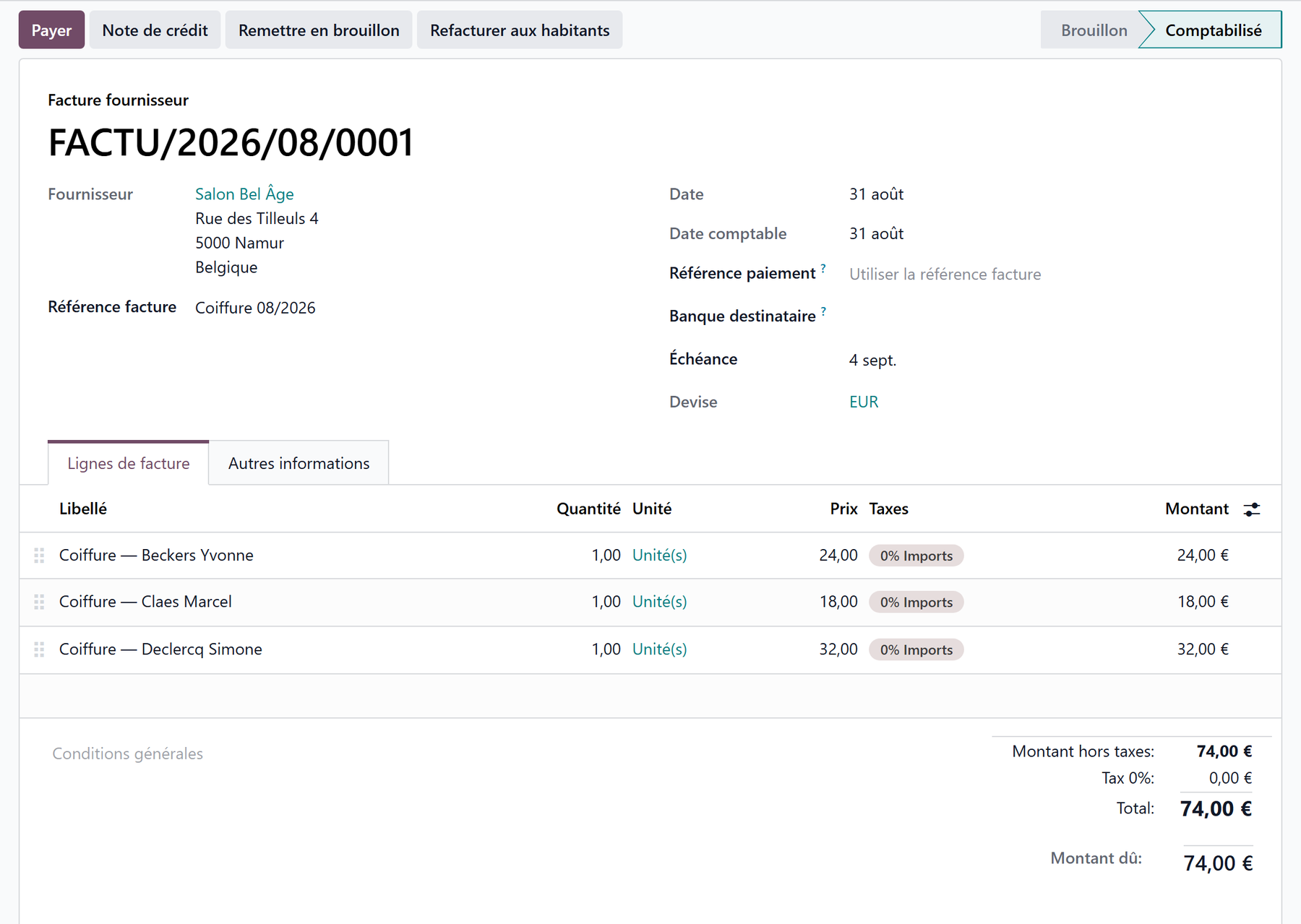
A smart button on the bill leads to the recharges it produced, and one on the recharge leads back to the bill: an amount on a family’s invoice can always be traced back to the supplier document that justifies it.
Starting from the app instead
The Supplements → Vendor-bill recharges menu does the same: create a recharge, pick the bill, and its lines come in.
2. Say who each line is for
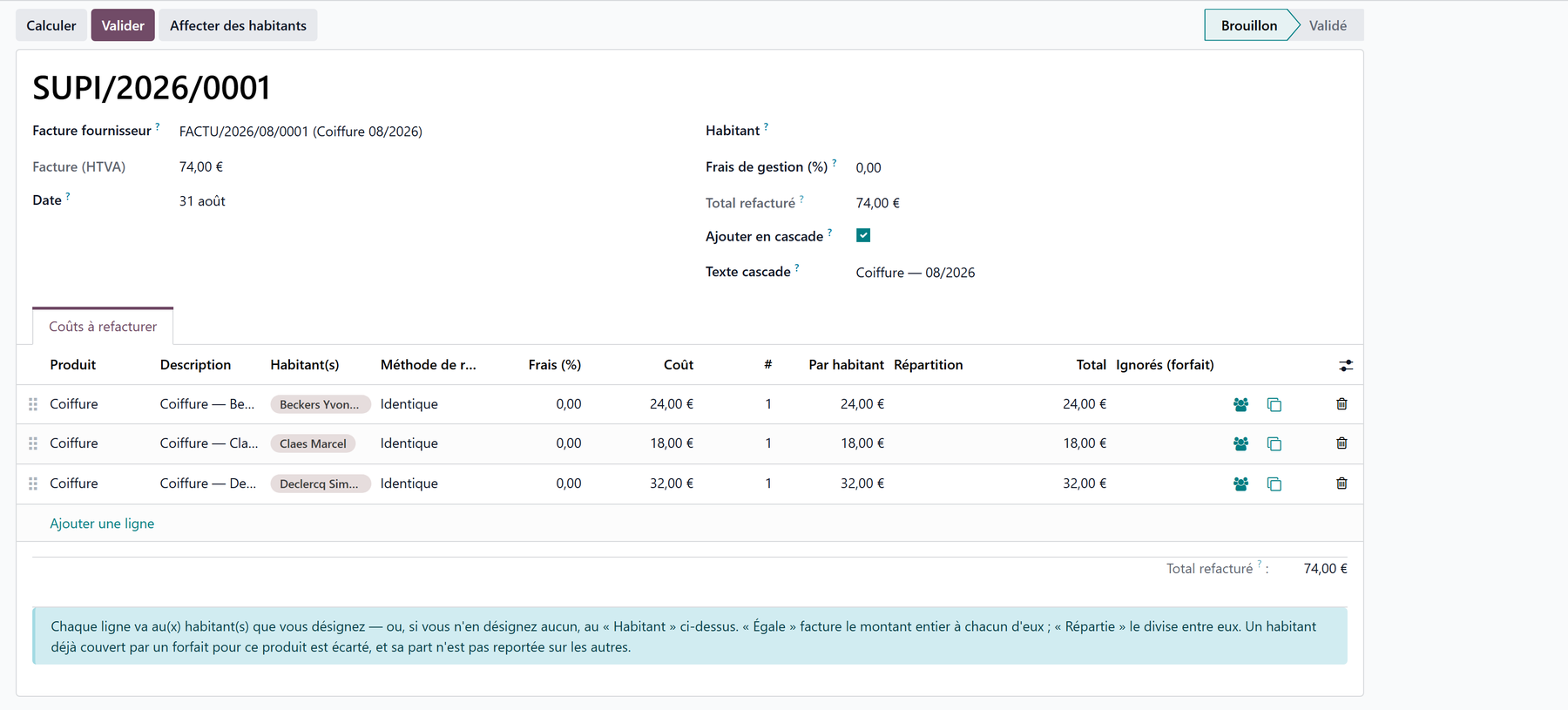
On each line, name the resident(s) and choose how the amount is split.
Column |
What it does |
|---|---|
Resident(s) |
Who this line is charged to. Left empty, the line goes to the Resident named at the top of the recharge |
Split method |
Equal: each resident is charged the full amount — the doctor co-payment case, where the line already states one resident’s share. Spread: the amount is divided between them — a 100 € outing for five residents |
Fee (%) |
Optional surcharge, 0 by default. A home that passes costs on at actual cost leaves it alone |
Per resident, Split, Total |
What each resident actually pays. When they do not all pay the same, the Split column spells the division out |
Skipped |
The residents a flat-rate agreement takes out |
The Assign residents button opens a picker where several residents are ticked at once and applied to one line, to the lines you selected, or to the whole recharge — the answer to a thirty-line statement.
Use Duplicate this line when one bill line covers several residents with different amounts.
Rounding never loses a cent
With Spread, 100 € over three residents gives 33,34 + 33,33 + 33,33. The remainder always goes to the first resident, so the shares add back up to the line total.
3. Add lines in cascade
A hairdresser’s statement is one line per resident, all worded the same. Tick Add in cascade and fill in the Cascade text: every line you then add opens with that wording and with the next resident of the house, in alphabetical order.

Adding a line then comes down to keying the amount.
Residents are served in alphabetical order, A to Z, and only those currently present.
The lines that came from the bill are never rewritten, so you can tick the box halfway through a document.
A wording or a resident you have already keyed is left alone.
4. Check, then validate
Compute is a dry run: it refreshes what each resident would be charged and tells you the total and the residents a flat-rate agreement leaves out. Nothing is written yet.
Validate writes one supplement on each resident’s open envelope. Resthome refuses first — before writing anything — when:
a line carries no supplement product (unless the home has set a fallback, see below);
a resident has already been charged for the same bill line by another recharge;
a resident’s envelope cannot be reached, because their month is already invoiced or they have no stay. All of them are listed at once, with the reason for each.
A resident on a flat rate is never charged twice
If a resident is covered by an active supplement convention for the same product, they are left out of the charge and appear in the Skipped column. Their share is not passed on to the others: a flat rate must never make the neighbours pay more.
Cancelling a recharge
Cancel withdraws from the residents’ envelopes the supplements the recharge created. It refuses as soon as one of them sits on a resident invoice — a draft invoice included, since that is the normal state between the generation of a period and its invoicing. Delete that draft invoice, or issue a credit note, and cancel afterwards.
A cancelled recharge can be reset to draft and used again.
A supplier credit note
A supplier credit note is recharged exactly the same way, and gives the money back: the residents are credited on their envelope instead of being charged a second time. The recharge says so in a banner.
Settings — “Other supplement”
Lines that name no supplement product stop the validation. A home that prefers them to go through anyway designates a fallback product in the Settings, in the Supplements section, under Other supplement: those lines are charged under it, and a note in the discussion thread lists them.
Left empty — the default — the recharge stops and names the lines to fix, which is the safer behaviour for a home that has not decided.
Key points to remember
One posted bill, one recharge, one supplement per resident — with the link back to the source bill kept in both directions.
Equal charges the full amount to each resident; Spread divides it.
Add in cascade pre-fills each new line with a common wording and the next resident, in alphabetical order.
A resident covered by a flat-rate agreement is skipped, visibly, and the others pay no more for it.
Cancelling is possible right up to the moment an invoice carries the supplement.