The candidate’s file
The Resident Admission tab is where the candidate’s file is built, without leaving the enquiry.
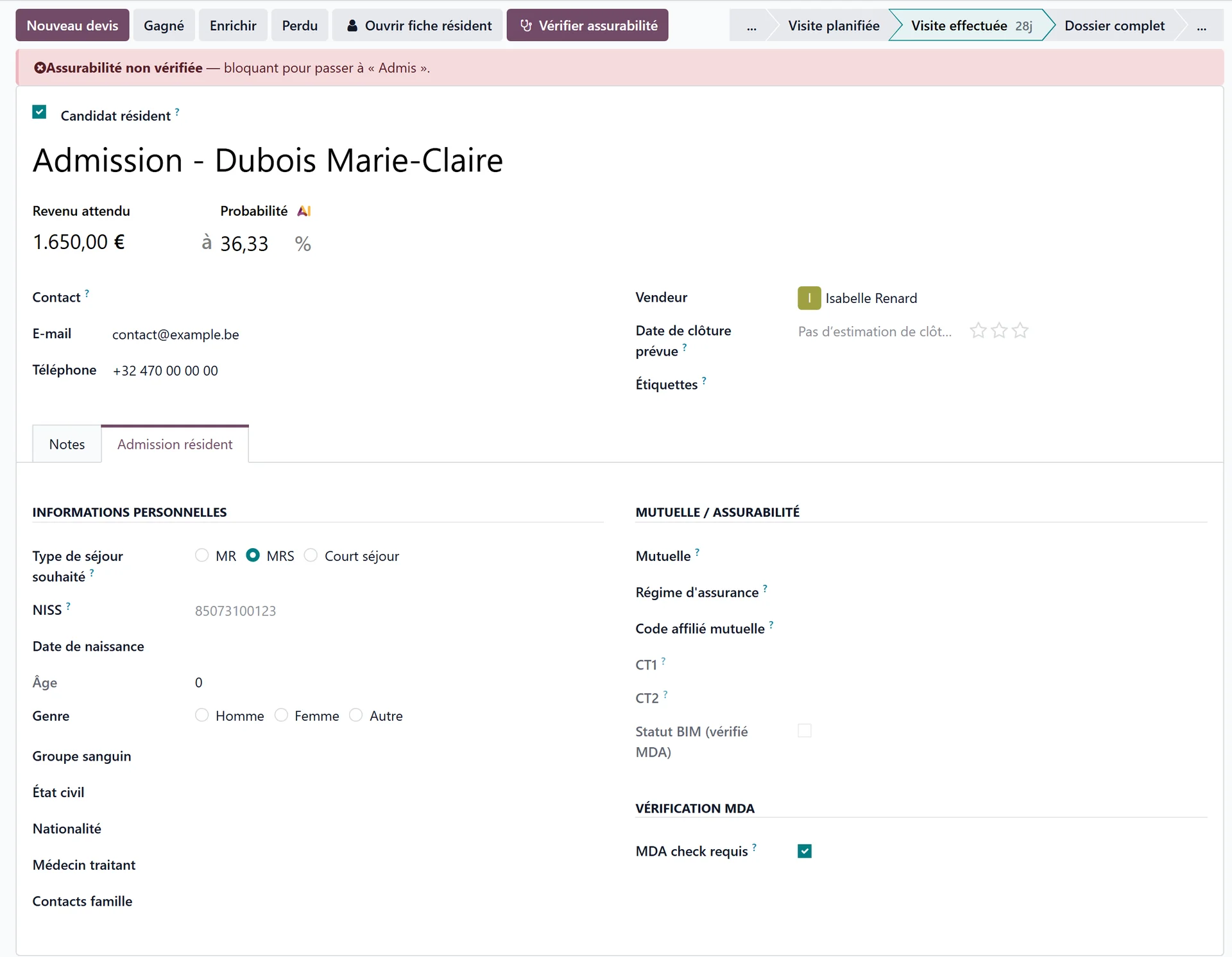
Personal information
Desired stay type — offered according to the sectors the home is licensed for. It is not required to fill in the file, but it is required to admit: it determines the bed and the documents the health insurer expects.
Short stay — derived from the stay type. It then asks for the number of short-stay days used this calendar year and for notes.
Identity: the national identification number, ID card and expiry, date of birth, age, gender, blood type, marital status, nationality, place of birth.
Resident language and spoken languages, religion.
Attending physician and deputy physician.
Family contacts, telephone, e-mail.
No approval on file
If the facility has no approval recorded, no stay type can be offered. The banner This establishment has no approval on file yet appears, with a Record the approvals link — fill them in first.
Short stays
Where the law caps the number of short-stay days per calendar year, enter the days already used — ask the family, or confirm with the health insurer — before accepting the admission.
In Belgium
The stay types are MR, MRS and day care, short stays are capped at 90 days per calendar year, and the identification number is the NISS: see Admitting a resident in Belgium.
Health insurer and insurability
This block records the resident’s health insurer and the membership details the country asks for.
Where the country has electronic exchanges with the health insurer, the block also carries an insurability check: one button queries the insurer and fills in the insurer and the membership details on its own. It needs the national identification number: without it, Resthome asks for it first.
The insurability check gates the admission
Where the check exists, moving to Admitted is refused as long as it has not succeeded. For a case that does not require it — a candidate with no national identification number, for example — untick the box that makes the check required.
If the answer comes back not insured, the admission is still possible: an orange banner warns that billing will have to be addressed to the resident, and the answer is recorded in the file’s history.
In Belgium
The block holds the mutuality, the CT1/CT2 codes and the BIM status, and the check is an MDA request sent with Check insurability: see Admitting a resident in Belgium and Insurability (MDA).
Key contacts
Three roles, each with a box to tick when the person does not exist:
Emergency contact — or No emergency contact
Legal representative — or No legal representative
Trusted person — or No trusted person
The box matters: it tells the team that the question was asked, rather than leaving an empty field that looks like an oversight.