Admitting a candidate
When the file is ready, the candidate becomes a resident. Two equivalent actions open the Admission wizard: drag the card into the Admitted column, or mark the file as won from the file itself.
1. Pass the checks
Resthome refuses the admission, on every path, as long as:
the Desired stay type is empty — the documents for the health insurer cannot be produced without it;
the insurability has not been verified, where the country has an electronic check — unless the file waives it.
A third check is about identity: if the national identification number entered already belongs to a resident, a banner names the existing record. The admission will be refused as long as the file points at a separate one.
One person, one record
The Link to that resident button fixes it in one click: the file is repointed at the existing record, and the empty duplicate created along the way is archived. A record already in use is never archived — the two are then merged by hand.
This is the normal path for readmitting a former resident: their history, assessments and documents come back with them.
In Belgium
The stay type is needed to produce Annexe 7, and the insurability check is the MDA, waived by unticking MDA check required. See Admitting a resident in Belgium.
2. Fill in the wizard
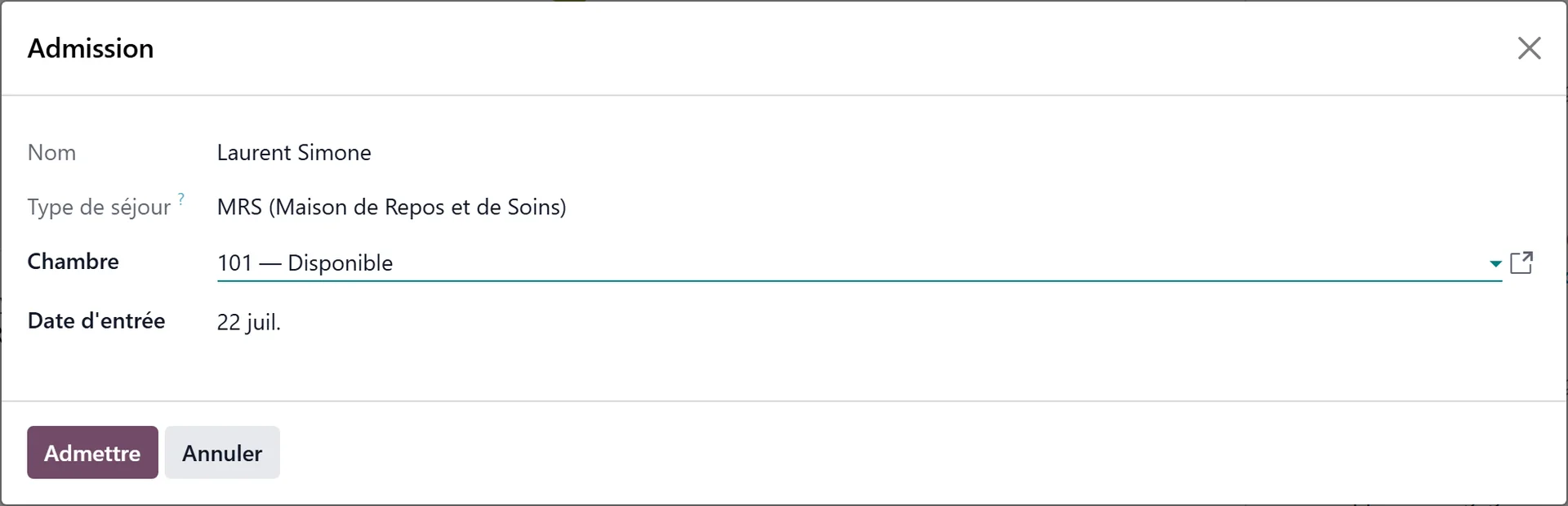
Stay Type — carried over from the file, read-only.
Room — required.
Stay start date — today by default.
Notes — copied into the stay’s admission reason.
Depending on the modules installed, the wizard also carries the invoice type and the split billing debtors.
Click Admit.
3. Check what was created
Resthome then:
turns the contact into a resident;
opens the stay in the Confirmed state, on the chosen room and date;
opens the resident’s record, to continue with the dependency assessment and the documents.
The stay still has to be started (Start Stay) once the resident is actually there. See Managing a resident.
Two dates not to confuse
Stay start date — when billing for accommodation (the room) begins. This is the one in the wizard.
Admission Date — when the care allowance paid by the health insurer begins. It is set when the stay is started.
They are often identical, but can differ.
In Belgium
Starting the stay prepares the admission agreement (Annexe 7) sent to the health insurer through eAgreement, and the Katz assessment sets the category declared for the INAMI allowance. See Admitting a resident in Belgium.
Safeguards
Closing the wizard creates nothing and brings the card back to its previous stage: the file is only won by Admit.
Moving a file out of Admitted cancels the stays still in draft or confirmed; a stay already started is left untouched.
No duplicate stay: the wizard reuses the file’s existing stay, or a stay of the resident that belongs to no file — never one belonging to another file. The room, the date and the stay type are pre-filled.