Shift screen
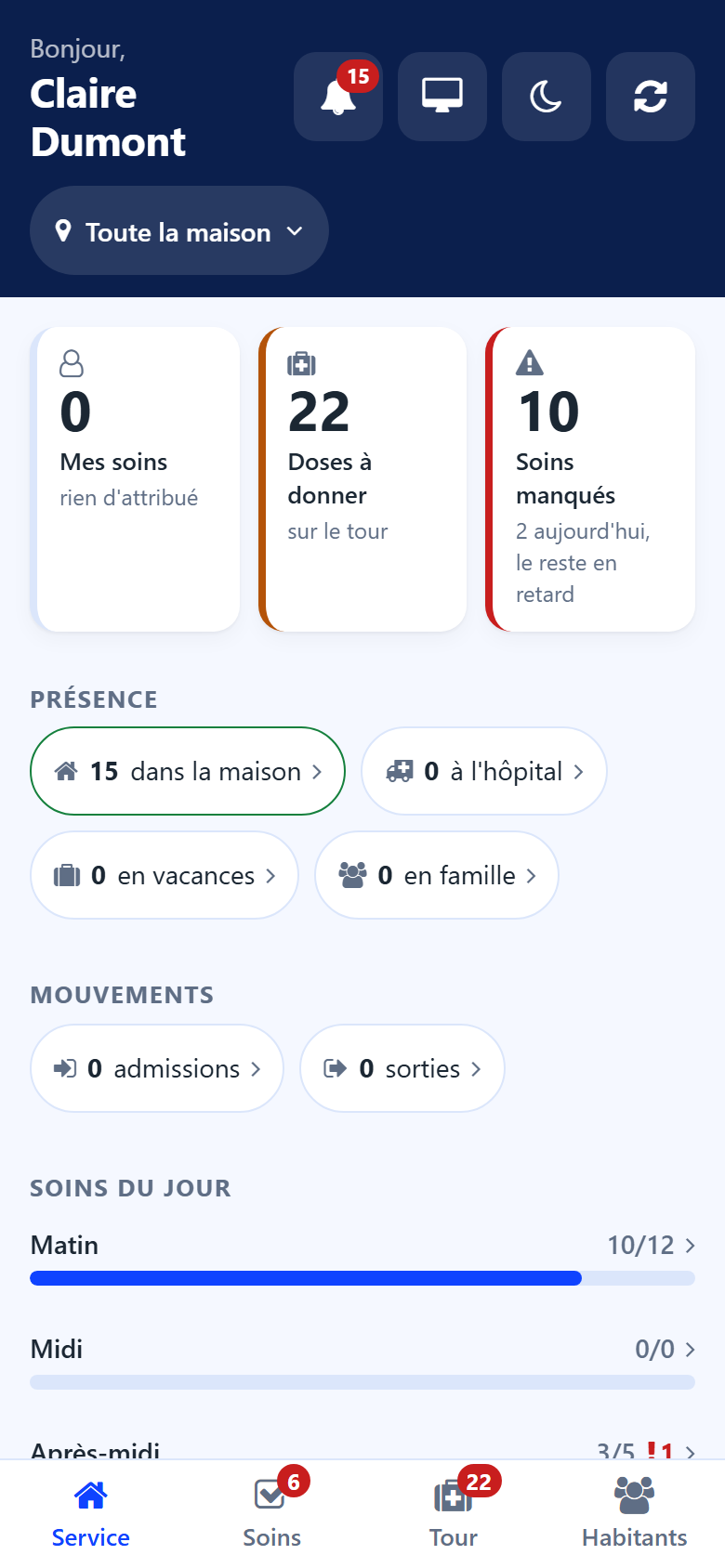
My shift is the first screen of the care app. It answers the question of the start of a shift: where things stand, and what comes next.
Counters
My cares — the cares assigned to you today.
Doses due — the doses still to give. The counter turns red when doses were missed.
Missed cares — the cares nobody did over the last days, still owed.
Tap a counter to open the list it counts.
Presence and movements
Presence — residents in the house, in hospital, on vacation, with family, and back today.
Movements — the day’s admissions and departures, and the residents deceased this week.
Every figure opens the list of the residents it counts. A button above the list reminds which figure you came from; tap its cross to see everyone again.
Today’s care
One bar per period of the day — morning, noon, afternoon, evening, night — shows the cares done out of the cares planned. A red number marks the missed cares of the period. Tap a bar to open that period’s cares.
Next
The next cares and doses, in time order, with the resident and the room. Tap a line to open the resident’s sheet.
When nothing is waiting, the screen says so: Nothing is waiting. The shift is up to date.