Pocket money
Some residents do not handle their own spending money: a third party pays a monthly amount to the home, which holds it for them. The hairdresser, the pedicure or a newspaper bought for the resident are then paid out of that money. WideCare keeps the account of it, resident by resident: what came in, what went out, what is left.
In Belgium
The pocket money of a resident supported by the CPAS is paid by the CPAS. See CPAS support.
How the money moves
graph LR
  A[Monthly provision<br/>on the ordinary invoice] -->|comes in| B[Pocket money<br/>account of the resident]
  B -->|pays| C[Purchases of the month<br/>on a second invoice]
  B -->|goes out| D[Cash handed<br/>to the resident]
All the money of the residents sits on one accounting account, the pocket money account. WideCare reads on it, for each resident, the entries in their name. Three movements change a balance:
The money comes in — every month, the provision is billed on the resident’s ordinary invoice, with the accommodation. Its line is not booked as revenue but on the pocket money account: as soon as that invoice is posted, the balance goes up.
The purchases are paid — what the home bought for the resident during the month goes on a second invoice. When it is posted, WideCare pays it out of the pocket money: the balance goes down and the invoice shows Paid.
Cash handed to the resident — when the home gives the resident money in hand, the accountant passes an entry that draws it from the pocket money account in the resident’s name.
The setup is described in Setting up pocket money, the month and the entries passed in the journals in Purchases and settlement.
Requires the accounting in WideCare
The balance is read from the home’s accounting entries. Pocket money is only available where the home keeps its accounts in WideCare.
Read a resident’s balance
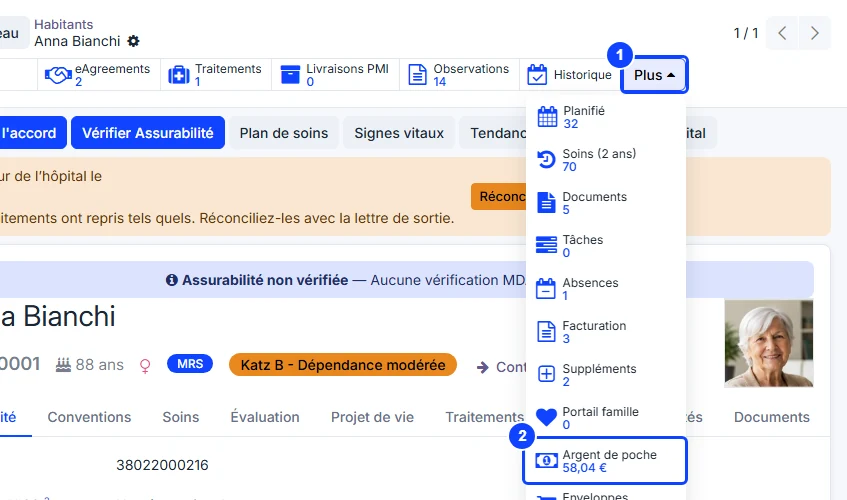
On the resident’s record, click More at the end of the row of buttons at the top.
The Pocket money button shows the available balance: what came in, minus what went out. Only posted entries count.
Click Pocket money to open the entries behind the balance, one group per accounting document:
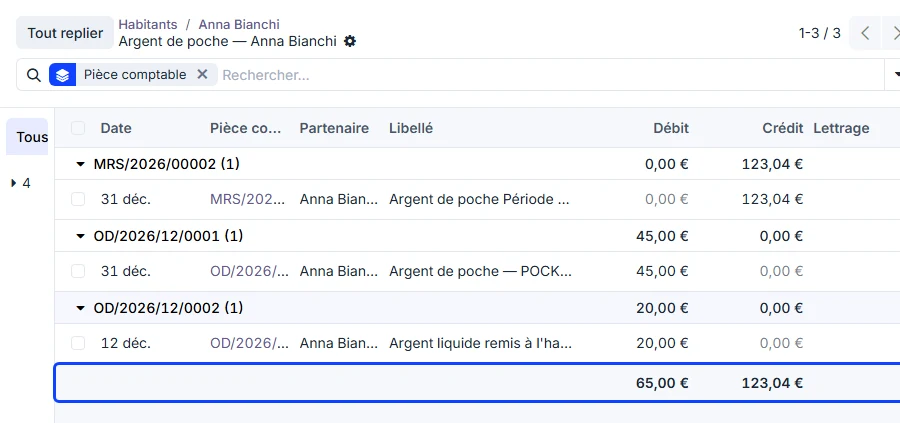
Credit — the money that came in: the provision of each month.
Debit — the money that went out: the purchases paid, the cash handed over.
Balance = total credit − total debit. Here 123.04 − 65.00 = 58.04, the figure on the button.
The Journal Entry column names the source: the ordinary invoice for a provision, a miscellaneous operation for a settlement or a cash payment. The entries themselves are detailed in Purchases and settlement.
Pocket money overdrawn
When the resident has spent more than came in, a red Pocket money overdrawn banner appears at the top of their record. WideCare blocks nothing: the home decides whether to keep buying for the resident.
Every balance in one list
In the residents list, the optional Pocket money balance column shows who holds what, without opening each record. It is hidden by default: add it from the optional columns of the list. The cell stays empty for a resident without pocket money — an empty cell is not a zero balance.
Several facilities
The balance is that of the company you are working in. A group running several homes reads each home’s balances by switching to that home.