Purchases and settlement
For a resident with pocket money, the monthly billing produces two invoices, once the Pocket money journal is set (see Setting up pocket money).
Two invoices a month
Invoice |
What it carries |
Journal |
|---|---|---|
Ordinary invoice |
Accommodation, the recurring supplements of the stay agreement, and the pocket money provision |
The resident journal |
Second invoice |
The supplements of the monthly envelope: what the home bought for the resident |
Pocket money journal |
The second invoice exists only when the month holds envelope supplements. In every other case — no pocket money, no journal set, nothing bought this month — the resident receives the single invoice they always received.
The month, step by step
During the month — the purchases made for the resident (the hairdresser, the pedicure) are added to their supplement envelope, as for any resident. See Supplements.
At the end of the month — generate the period and create the invoices as usual. See Invoice a month, step by step.
Post the ordinary invoice — it carries the provision, under Convention supplement. Once posted, the provision is credited to the resident’s pocket money: the balance goes up.

Post the second invoice — WideCare pays it out of the pocket money at once: the invoice shows Paid, with the date of the settlement under the total, and the balance goes down by the same amount.
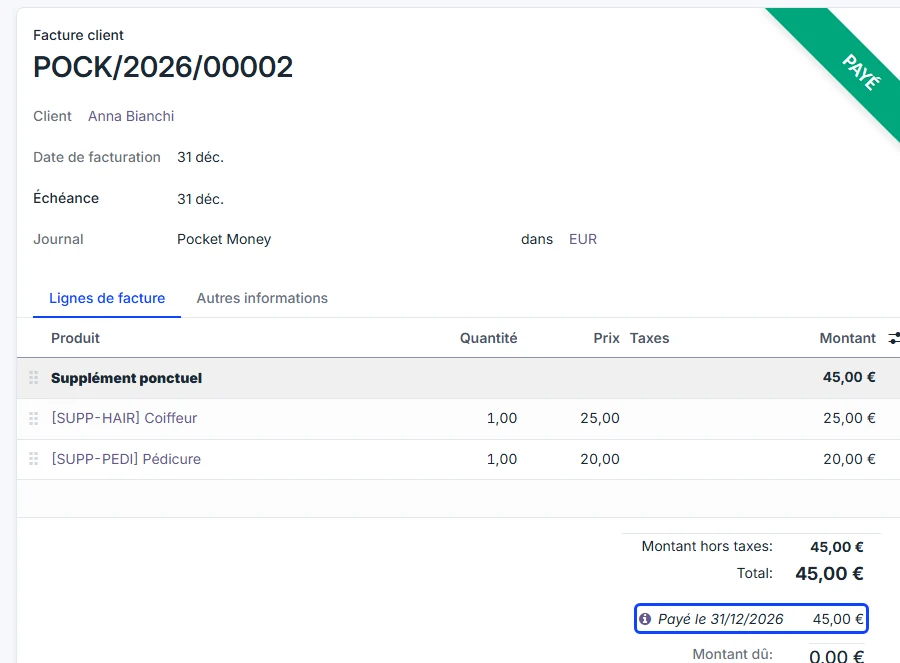
To open the settlement entry, click the ⓘ icon on the Paid on line under the total, then View. The entry carries the invoice’s date and the reference Pocket money settlement — POCK/…, with the number of the invoice it paid.
The ordinary invoice, for its part, stays to be paid by whoever pays it — the resident, the family or the public body — like any invoice.
Split billing
When the resident share is split between several debtors, the split concerns the ordinary invoice. The second invoice is paid out of money the home already holds for the resident, and is not split. The provision billed to a debtor still credits the resident’s own balance.
What is booked in the journals
With the provision of 123.04, a hairdresser of 25.00 and a pedicure of 20.00, the month passes these entries. Only the pocket money lines move the balance.
Document |
Journal |
Debit |
Credit |
|---|---|---|---|
Ordinary invoice — provision line |
Resident journal |
Receivable of the payer 123.04 |
Pocket money account 123.04 |
Second invoice |
Pocket money journal |
Receivable of the resident 45.00 |
Revenue (hairdresser, pedicure) 45.00 |
Automatic settlement |
Miscellaneous Operations |
Pocket money account 45.00 |
Receivable of the resident 45.00 |
The provision is not revenue for the home: it is money it now holds for the resident, so it is credited to the pocket money account.
The second invoice is an ordinary sale: the home sold the hairdresser and the pedicure, which are its revenue.
The settlement pays that invoice with the resident’s money: it debits the pocket money account and clears the receivable. The two are reconciled, which is why the invoice shows Paid.
Every pocket money line carries the resident’s name, even when the invoice is addressed to someone else: that is how WideCare finds each resident’s share on the one account.
In Belgium
With the Belgian chart of accounts, the accounts are typically 400000 Clients for the receivables, 700000 for the revenue and the pocket money account of class 4, for instance 489500.
Cash handed to the resident
When the home gives the resident money in hand, the accountant passes a miscellaneous entry:
Debit |
Credit |
|---|---|
Pocket money account, with the resident as partner |
Cash |
The balance goes down by the amount handed over. Without the resident as partner on the pocket money line, the entry is not counted in their balance.
When something differs
Back to draft — putting the second invoice back to draft deletes the settlement entry, and the balance goes back up.
A purchase billed by mistake — on the second invoice, click Credit Note, then Reverse, and post the credit note: the amount goes back into the balance. Reverse and Create Invoice cancels the invoice and its settlement, and opens a new second invoice to correct and post.
A purchase added after the month was posted — add it to the resident’s envelope as usual. It goes on a corrective invoice in the pocket money journal, listed under Corrective documents on the period (Refresh if it is not there yet). Posting it pays it out of the balance.
Not enough money — the settlement is passed anyway; the balance becomes negative and the record shows Pocket money overdrawn.
No settlement journal — nothing happens on posting: the accountant passes the settlement by hand, and the balance only shows what came in.
No pocket money journal — the purchases stay on the ordinary invoice and are not paid out of the pocket money.
Pocket money ticked after the invoices were created — on the period, click Reset to Draft, then Generate and Create Invoices again: the purchases move to a second invoice in the pocket money journal. Residents whose invoice is already posted are not changed.
Pocket money journal changed — a draft second invoice moves to the new journal the next time the period is generated. One that already has a number stays in its journal.
What’s next
Pocket money — read a balance and the entries behind it